IDN Exploit In Firefox

I found out today there is a pretty, well very serious flaw in the various non IE browsers. Firefox is the one I am most concerned about becuase I use it constantly.
This exploit affects all browsers except IE. It has to do with the International Domain Name [IDN] support in modern browsers. The attack allows an attacker/phisher to spoof the domain/URLs of businesses.
There is a proof of concept document that will show you exactly what it can do; there is even an SSL connection that works as well, so much for a secure connection. Try it out before you apply the fix, but not in IE! There are several articles and workaround/fixes out there. I have been messing around with them all morning and here is the run down.

  1. There is a fix listed on Boing Boing. It says to type about:config in the address bar, find network.enableIDN and set it to false. This only works until you close Firefox and re-open it. Then the links at proof of concept will work again. It also broke my Macromedia News extension, don’t waste you time on this fix!
  2. Back up the compreg.dat file first, if you attempt this fix! There is another fix listed on tech.life.blogged. This one says to edit the compreg.dat file that is located in your profile directory, eg. On XP: C:\Documents and Settings\USERNAME\Application Data\Mozilla\Firefox\Profiles\default.###\ Then you open the compreg.dat file in a text editor (I strongly suggest TextPad), find and modify the @mozilla.org/network/idn-service;1,{62b778a6-bce3-456b-8c31-2865fbb68c91} line. Change the 1 to a 0 and save the file. I tried this fix and it works, but the post states it is a permanent fix and it is not. The problem is that if you install a extension the compreg.dat file is reloaded and the 1 in @mozilla.org/network/idn-service; 1,{62b778a6-bce3-456b-8c31-2865fbb68c91} line is resored and the fix is lost. You will manually have to edit compreg.dat and change the 1 to a 0.
  3. The third fix I found at mozillaZine and advises to use AdBlocker to create a filter that will block any URL that uses characters that are outside the normal ASCII range. I have highlighted the steps to follow below:
  1. If you do not have Adblocker installed go here and install it!
  2. Once it is installed, in Firefox, goto Tools, Adblock, and open Preferences
  3. Important!! On the Preferences windows select Adblock Options and select Site Blocker: Note: Site Blocking will now have a check next to it.
  4. In the New Filter input box enter the following text: /[^\x20-\xFF]/
  5. Select Add next the New Filter input box to add the rule. Note: You will receive a Warning dialog when you select Add, just select OK to apply the filter.
  6. Select Done
  7. Go to the test page and select a link. The links will be blocked and should not load. Note: They had a paypal link but have since changed it. You still can see a nice sample of the domain spoofing.

I use Firefox everyday and love every minute of it. From what I read Firefox is working on a perminant fix that will eleminate this issue. I thought I would share this and the information I found out there about it, I would hate for a reader to expose personal information or financial data by this kind of attach. I always suggest to everyone on the internet, learn security, keep up to date on the kind of attachs going on, and most importantly, protect yourself and you data!

You can find out more details about the attach from The state of homograph attacks document.

http://www.boingboing.net/2005/02/06/shmoo_group_exploit_.html
EU process on software patents restarted

Since first reading of this here I have been trying to follow it. It seems a great victory was published today:

Florian Mueller, manager of the pan-European NoSoftwarePatents.com campaign: From the bottom of my heart I wish to thank all of those who made this possible, particularly the FFII, the Polish government, key parliamentarians in all political groups, and those companies and people who supported my campaign, especially in the days leading to this decision. “The NoSoftwarePatents.com campaign was brought into being with the support of three IT companies: 1&1 from Germany (world’s largest web hoster), Red Hat (premier Linux company) and MySQL AB (Europe’s largest open-source software company). Lobbying for a restart of the process was one of the initially stated goals of the campaign. “The Empires will strike back” in Mueller’s prediction. Even until the beginning of the committee meeting, such corporations as Microsoft, Nokia, Ericsson and Alcatel had tried to thwart the plans, hoping to achieve the legalization of software patents in the EU at the earliest opportunity. read the full article

A big THANKS to alessandro for posting this important topic! 😉

SEPY 1.0.6.49, new feature

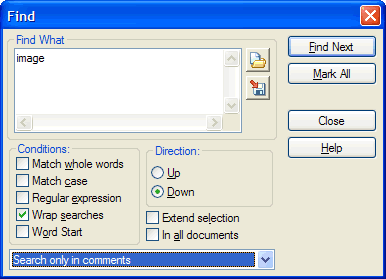
Here comes a new SEPY release with a major change in the interface: the Find dialog In particulary:

  1. multiline text dialog
  2. search can be now made not only in all the document text, but a filter can be used:
    • search only in comments
    • search only in strings
  3. open/save search status. This will save all the options and text currently in the dialog window (useful when using long regular expressions which we want to remember in future)
  4. Word Start: find text only if the character before is not a word char.

Added a guide for the find operations (with also a guide to the regular expression syntax which you can use in scintilla) I hope these changes are welcome, and expecially they works..

http://sourceforge.net/projects/sepy/

Natural Docs

I recently discovered this project (opensource) thanks to a post in SEPY feature requests. Natural Docs is an open-source, extensible, multi-language documentation generator.
It has native support for C#, Perl and ActionScript2 (PHP, Python, etc. has basic support).
It seems a really valid project, the problem (for me) actually is that is doesn’t support javadoc, even if I read on its forum that he’s planning to support it in the future.
Natural Docs requires Perl 5.05 or higher to run. If you’re using Linux or Mac OS X, you should already have it. If you’re using Windows and haven’t installed it yet, you can get ActiveState’s ActivePerl for free.
There are free versions available for many other platforms as well.

Download Version 1.34 from sourceforge.net site

Charset handling proposal in AMFPHP

Patrick Mineault makes a proposal for the charset handling in AMFPHP

[..] that should put an end to problems with Unicode and native character set handling between PHP and Flash, a problem that has palgued AMFPHP for a long time

To use charset handling in the new CVS version, you will need to call the setCharsetHandler function from your gateway.php file, like this:

$gateway->setCharsetHandler("iconv", "latin1", "latin1");

Detail for setCharsetHandler method: setCharsetHandler(string mode, string phpCharset, string sqlCharset) The mode can be: 1. none (don’t do anything) 2. iconv (uses the iconv libray for reencoding) 3. mbstring (uses the mbstring library for reencoding) 4. recode (uses the recode library for reencoding) 5. utf8_decode (uses the XML function utf8_decode and encode for reencoding – ISO-8859-1 only) I haven’t tested it already, but I’m sure this is a great step toward a solution of the charset problem!

http://www.amfphp.org/wiki/doku.php?id=charset_issue

Javascript quick reference

I was reading Christian Cantrell‘s weblog and i found a very useful link which display in the left sidebar of your firefox browser the javascript reference (css, dom, xsl, html, unicode tools).
In order to use check it out by saving this URL as a bookmark, and checking the ‘view in sidebar’ option in it’s properties: http://lachy.id.au/dev/mozilla/sidebar/sidebar.xul
Also very very useful the unicode tools

http://lachy.id.au/dev/mozilla/sidebar/sidebar.xul

Yet another Encryption Software?

Today I received an email claiming a new Flash encryption software, Sintrix Flash Encrypt v1.0. It pretends to be the best encryption software, for these reasons: – Flash Encrypt not only uses Obfuscation but also attacks the Decompiler itself. In most cases, Flash Encrypted files are not even readable by Decompilers yet they still play perfectly in a Flash Player. Flash Encrypt makes it so that the Flash Decompiler can not even open the SWF file giving you 100% protection – What makes Flash Encrypt stand out as the leader of any Flash protection is the fact that Flash Encrypt has a full staff of people continuously searching, identifying, and finding ways to defeat decompile software as it is released and then getting it to you the customer via auto-updates. No matter how popular the decompile software, no matter how big or small, Flash Encrypt will defeat it and give your ActionScript protection from theft. Below are some of the Decompile Software packages that Flash Encrypt currently defeats. Imperator FLA, Eltima Flash Decompiler, Action Script Viewer, Sothink SWF Decompiler and more. Actually it comes in 2 versions: Home Edition for $49.99 and Corporate Edition for $149.99.
I will take it a try with the trial version, even if i read on the download note that the demo version comes without the main encryption engine. This demo is only to give you minor protection and give you the basic idea of the look and feel of Flash Encrypt. Should I spend 149.99 and I cannot test its encryption engine before?? This is not good at all!

http://www.sintrix.com/flash-encrypt.html